

This post may contain affiliate links. If you use these links to buy something we may earn a commission at no extra cost to you. Thank you for your support!
If you’re a freelancer thinking about starting a blog, you’ve probably heard other freelancers mention “AdSense earnings” like it’s some kind of secret passive income cheat code. It isn’t a cheat code.
But it is one of the most accessible, beginner-friendly ways to start monetizing a new blog, and this guide walks you through exactly how it works, step by step.
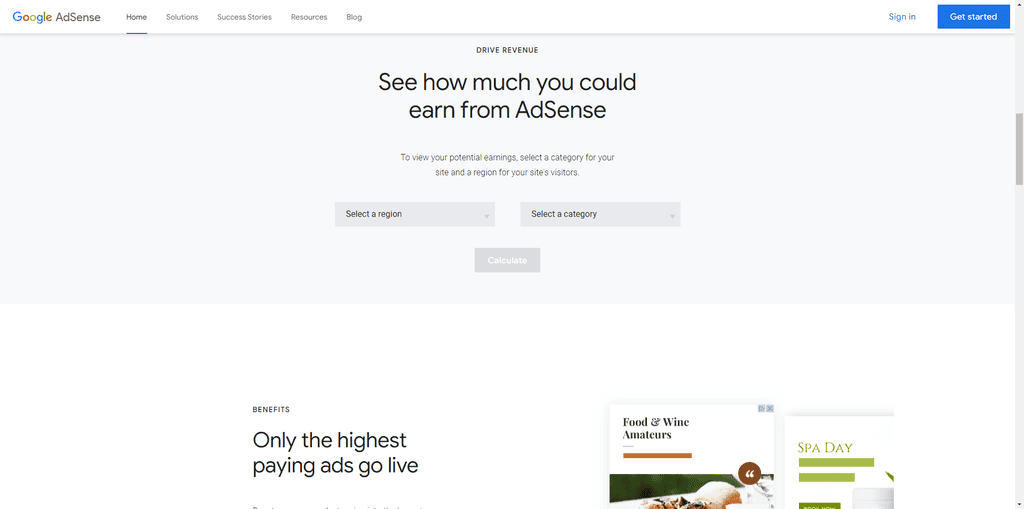
Adsense Revenue Calculator – Image source
By the end of this, you’ll understand what AdSense actually is, how it works behind the scenes, how to read your performance metrics without getting confused, and the easiest way to get from “brand new blog” to “first payout.”
What Is Google AdSense, and Is It A Good Idea To Use It?
Google AdSense is a free program run by Google that lets website owners and content creators place ads on their blog posts and web pages. (yay!!)
When a visitor sees or clicks one of those ads, you earn a small amount of money. Multiply that across thousands of page views, and it adds up to real income over time.
It’s technically an advertising network, a matchmaking system between business owners who want to advertise and website owners who have ad space to sell. You don’t deal with individual advertisers directly. Google handles all of that in the background and simply shows the most relevant ads to your specific audience based on your content, their search history, and a number of factors most bloggers never need to fully understand.
For freelancers specifically, this matters because it’s one of very few monetization paths that requires zero sales skills.
You’re not pitching clients, you’re not negotiating direct deals, you’re not running a shop. You write helpful content, Google places relevant ads next to it, and you get paid a cut of what advertisers spend.
It’s a genuinely good option and a great first step if you already enjoy writing and want a slow-building passive income stream alongside your freelance work.
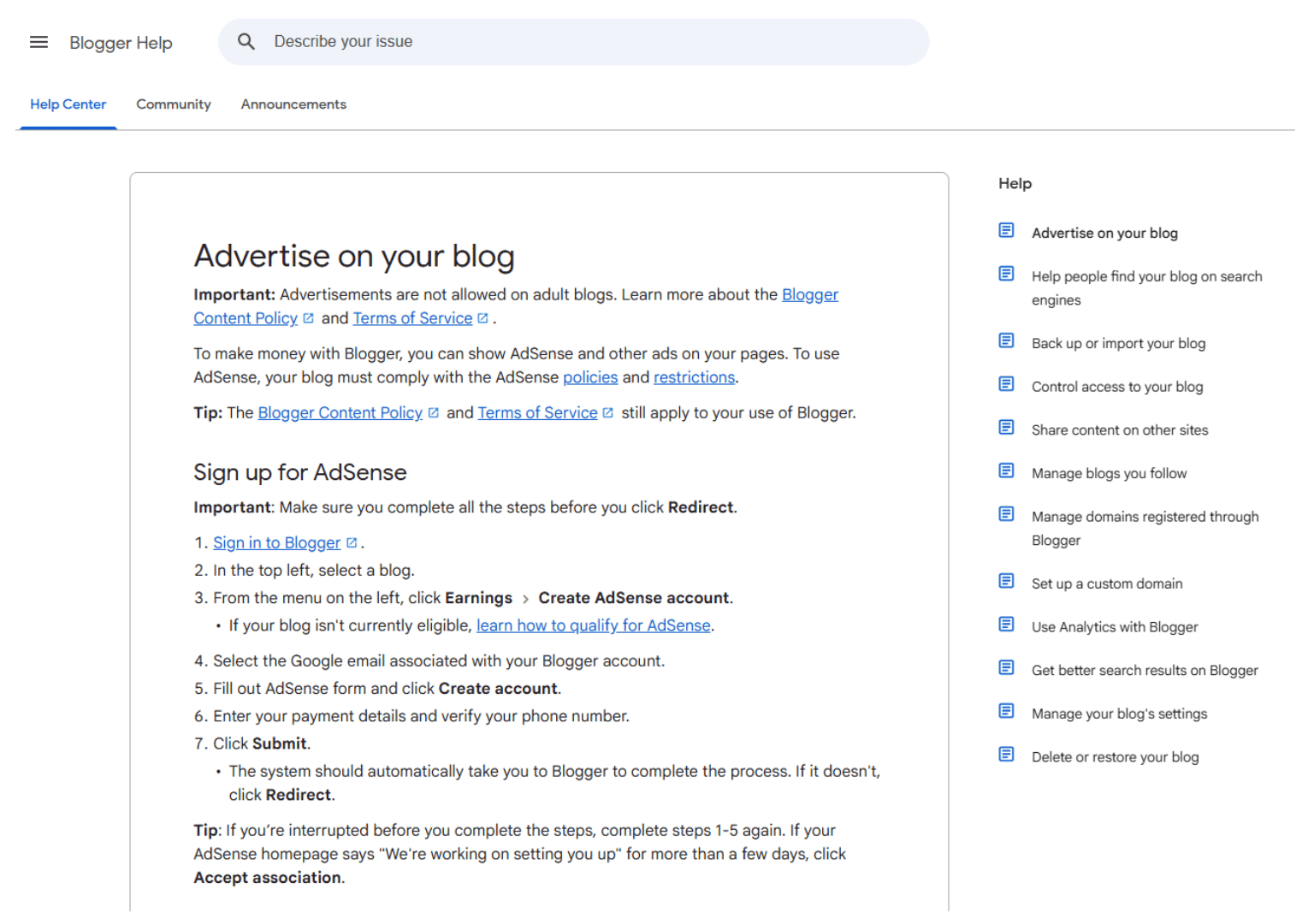
How Does Google AdSense Program Really Work?
Here’s the first thing to understand: AdSense doesn’t pay you just for having ads on your page. It pays based on a mix of impressions (how many people saw the ad), visitor clicks (how many people clicked it), and, increasingly in 2026, on Google’s AI-driven contextual matching, which decides which specific ad format and advertiser is most likely to perform well on that exact page for that exact visitor.
The basic mechanics:
1.You get paid based on a combination of ad impressions and clicks, tracked and reported inside your AdSense dashboard.
2. You sign up for a Google AdSense account and add your blog’s URL.
3. Google’s system reviews your site for policy compliance and content quality.
4. Once approved, you paste a small code snippet into your website (most blogging platforms make this a one-click integration).
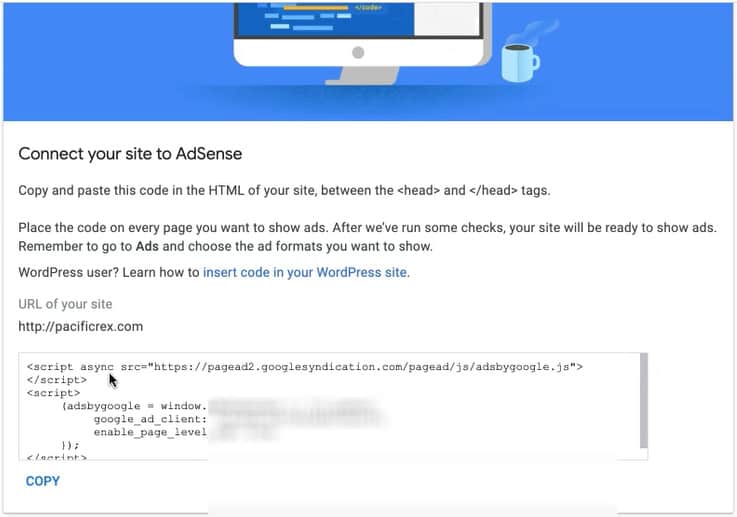
Connecting your blog to Adsense
Google’s ad units automatically scan your blog posts and display the most relevant ads to each visitor, based on their browsing behavior and your content topic.
A quick note most beginners miss: AdSense earnings are not the same as raw traffic.
Two blogs can get the exact same number of page views and earn wildly different amounts, because click-through rates, niche, ad placement, and visitor intent all affect actual earnings. A finance or insurance blog will typically out-earn a general lifestyle blog per visitor, purely because advertisers pay more to reach that specific audience.
Is AdSense blogging a good fit for freelancers?
It depends on what your website is supposed to do.
If you are a freelance copywriter, designer, media buyer, or virtual assistant using your site mainly to attract leads, AdSense may not be the smartest first monetization method. One client can be worth far more than months of ad revenue. A site visitor who clicks away on an ad instead of booking a call is not exactly a win.
But if you are building a content-heavy brand, publishing educational articles, and aiming for broad search traffic, AdSense blogging can become a secondary income stream. This is especially true if your content covers topics with large search volume and informational intent. In that setup, ads do not replace your services. They monetize the visitors who were never going to hire you anyway.
That is the key distinction. If your blog attracts future buyers, keep the path clean. If your blog attracts general readers at scale, ads may make sense.

AdSense vs. Other Advertising Networks: A Quick Comparison
Before you commit fully to AdSense, it helps to see how it stacks up against other ad networks freelancers commonly use once their blog starts growing.
| Ad Network | Traffic Requirement | Typical RPM (per 1,000 views) | Best For |
|---|---|---|---|
| Google AdSense | None (any approved site) | $1 – $10 | Brand new blogs, first-time monetizers |
| Media.net | None, but stronger with steady traffic | $2 – $8 | Contextual/native ad style, good AdSense alternative |
| Ezoic | None | $5 – $15 | AI-optimized ad placement testing for growing blogs |
| Monumetric | ~10,000 pageviews/month | $6 – $15 | Mid-size blogs ready to graduate from AdSense |
| Mediavine | ~10,000–50,000 sessions/month | $15 – $40 | Established blogs, especially food, travel, parenting |
| Raptive (formerly AdThrive) | ~25,000+ pageviews/month | $20 – $50+ | High-traffic, established content creators |
The honest, unbiased answer to “which one should I use?” is: start with Google AdSense because it has the lowest barrier to entry for advertising space, then treat the others as your “next step” once your traffic and content library grow.
Most successful bloggers actually follow this exact progression: AdSense first, then Ezoic or Media.net, then Mediavine, then Raptive, rather than jumping straight to a premium network before they have the traffic to qualify.
How to Read Your AdSense Charts and Dashboard
This trips up almost every new blogger, so let’s do a closer look at what you’re actually staring at once your account is live.
Your AdSense dashboard has a few key performance metrics worth understanding from day one:
- Page views – how many times your blog posts were loaded by visitors. This is your foundation metric; without much traffic, none of the other numbers matter much.
- Impressions – how many times an actual ad unit was shown to a visitor (not the same as page views, since one page can show multiple ad units).
- Click-through rate (CTR) – the percentage of people who saw an ad and clicked it. Industry averages sit low, often under 2%, so don’t panic if your number looks small.
- CPC (cost per click) – how much advertisers paid, on average, for each click on your site.
- RPM (revenue per mille) – your earnings per 1,000 page views. This is the number most bloggers watch closest, since it reflects your actual earning efficiency, not just raw traffic.
- Estimated earnings – your running total for the day/month, though this can fluctuate until Google finalizes numbers (usually a few days later).
A good habit: check your dashboard on a regular basis, but not obsessively though it can be super irresistable!
Weekly is usually enough for a new blog. Daily fluctuations are normal and rarely mean anything on their own. What matters is the trend over weeks and months.
How to Get Started With AdSense Blogging: 7 Simple Steps
Here’s your actual step-by-step path, written specifically for someone starting completely from zero.
Step 1: Choose a profitable niche and a specific audience.
Pick a topic you can write about consistently, ideally one that solves a specific problem for a specific audience. Broad “lifestyle” blogs work, but niche blogs (personal finance for freelancers, productivity tools, pet care, home cooking) tend to attract more relevant content for advertisers to target, which usually means better RPM down the line.
Step 2: Set up your new blog on your own domain.
Free blog platforms (like a subdomain on Blogger or a free WordPress.com plan) technically work, but Google’s own AdSense policies favor sites you fully own. A self-hosted domain gives you complete control over design, ad placement, and future monetization options, including affiliate marketing and direct deals down the road.

Step 3: Publish high-quality content consistently.
This is genuinely the hard work part, and there’s no shortcut around it.
Google’s 2026 approval standards lean heavily on “helpful content”, ie, original, well-researched blog posts that clearly answer a reader’s question, not thin AI-generated filler.
Most successful applicants in 2026 have somewhere between 15 and 25 solid posts (800+ words each) published before they even apply. Think of this stage as building the foundation your entire monetization efforts will sit on.
Step 4: Add the essential pages.
Before applying, make sure your blog has an About page, a Contact page, and a Privacy Policy. These aren’t optional extras. Google’s reviewers check for them specifically, and missing pages are one of the most common, entirely avoidable rejection reasons.
Step 5: Apply for your Google AdSense account.
Head to google.com/adsense, sign up with your Google account, and submit your blog’s URL for review.
There’s no official minimum traffic requirement, though a small, steady stream of organic visitors (from search engines or social media) helps Google confirm real people are actually reading your blog’s content, which speeds up approval.
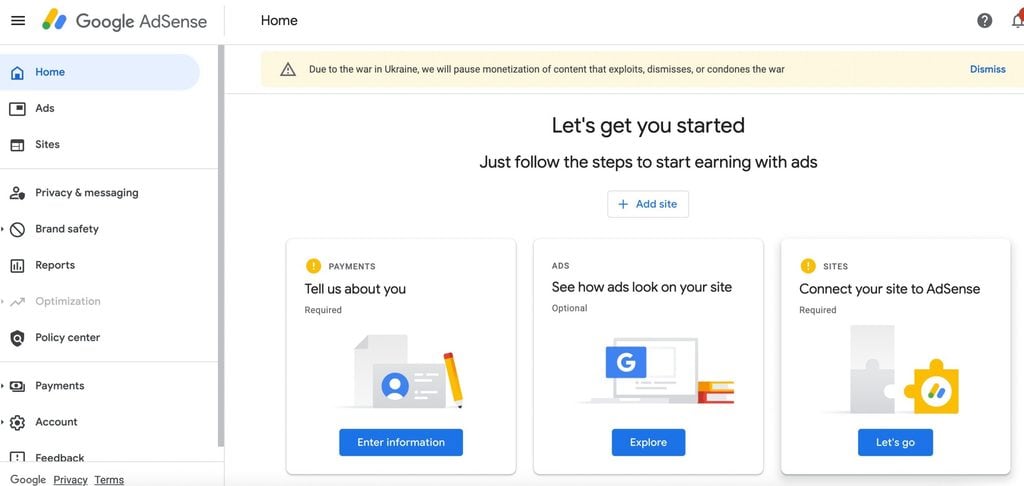
Google Adsense Application – Image from RankMath
Step 6: Wait for review, then place your ad code.
Review typically takes anywhere from a few days to a few weeks.
Once approved, Google gives you a code snippet to add to your site. Most CMS platforms (WordPress especially) have plugins that handle this without you touching a line of code.
Step 7: Choose your ad units and start testing placement.
Once live, you can choose from different ad formats – yay, exciting! – text ads, display ads, in-feed ads, in-article ads, and Auto Ads (where Google’s AI decides ad placement and different ad sizes for you automatically). Start simple, watch your performance metrics for a few weeks, then adjust.
Best Practices for Ad Placement
Where you put your ads matters almost as much as the content itself. A few best practices worth following from day one:
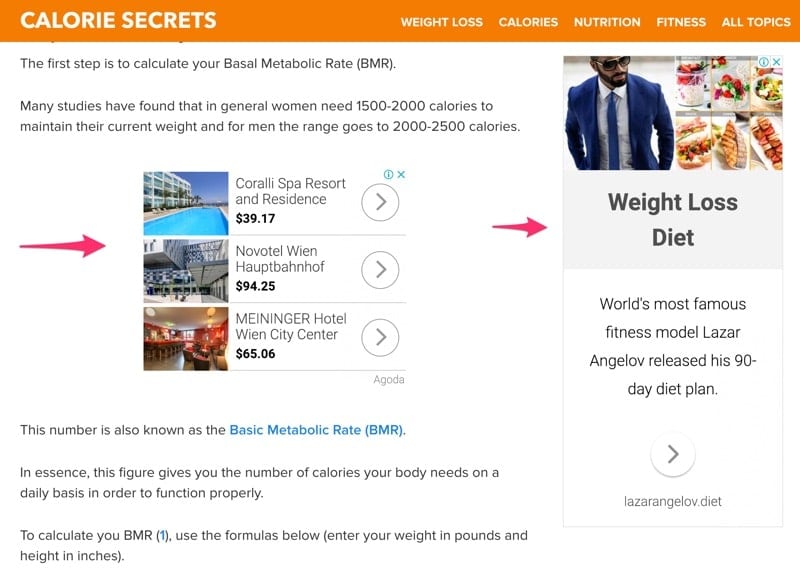
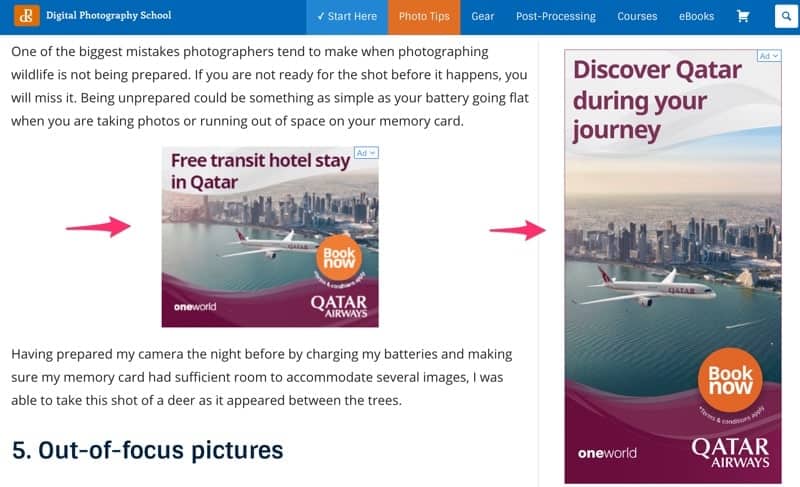
Best practices for ad placement – Image source
- The top left and above-the-fold areas of a page tend to get the most eyeballs, but Google’s own policies discourage stuffing ads there in a way that hurts user experience. Balance visibility with readability.
- Placing an ad unit right after the first paragraph of a blog post is a genuinely great way to catch attention before readers scroll away.
- Don’t over-stuff a page with ad space. Too many ads on one page slow load times, hurt user experience, and can actually lower your earnings by driving readers away before they see anything.
- Test different ads and different formats and different places on the page using AdSense’s built-in A/B testing tools rather than guessing. Small placement changes can meaningfully change your click-through rates.
When AdSense blogging makes sense
There are a few scenarios where AdSense fits surprisingly well.
The first is when your blog targets top-of-funnel keywords with huge traffic potential. Think broad educational searches, tool explainers, platform comparisons, and beginner guides. This type of content can bring in a lot of readers, even if only a small percentage will ever become clients.
The second is when your service business already has a strong lead pipeline. If clients come from referrals, outbound, YouTube, email, or social media, then your blog does not need to carry the full weight of conversion. It can become an asset that earns on its own.
The third is when you are building a media arm alongside your freelance business. This is a smart move for experienced operators. Service revenue gives cash flow. Content gives scale. Ads give one more monetization layer. Different income streams, same website ecosystem. Shiok if you can make them work together.
When it is probably the wrong move
If your site gets low traffic, AdSense can become a distraction. You may spend months writing articles, adjusting placements, and checking tiny earnings instead of building a higher-leverage offer.
It is also a weak fit for premium positioning. If you charge high-ticket rates, your website experience matters. Too many ads can make your brand feel cluttered or cheap, even when your work is excellent.
And if your niche has low traffic potential, AdSense blogging becomes even harder. A specialized B2B consultant may only ever attract a small but valuable audience. In that case, a lead magnet, email funnel, or workshop offer often beats display ads by a mile.
The numbers behind AdSense income
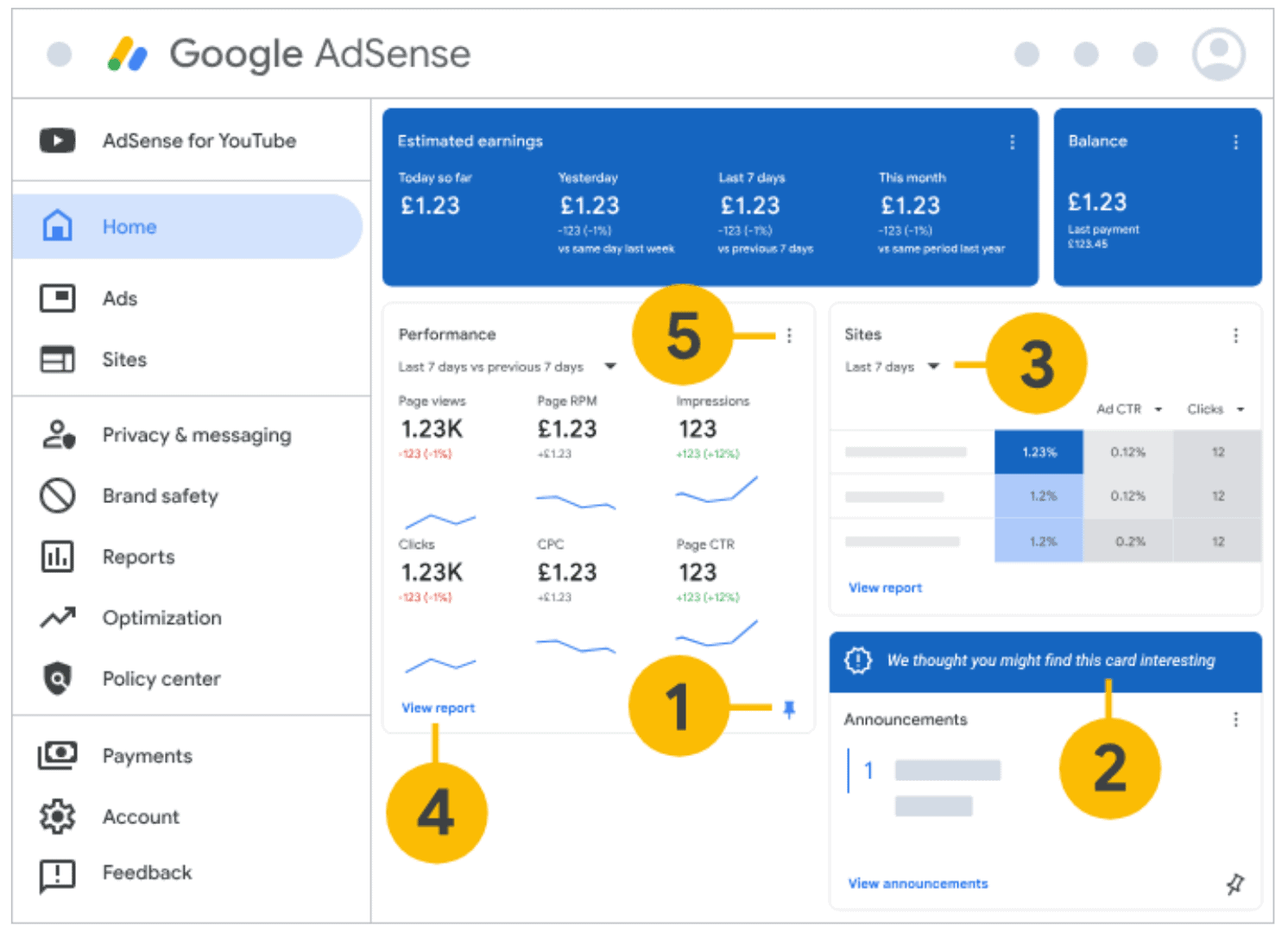
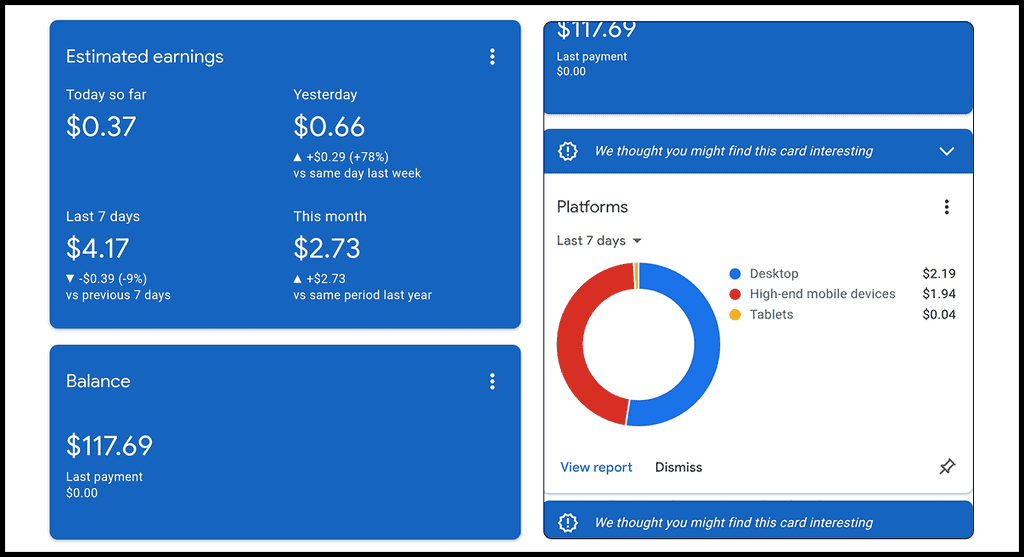
Here’s the breakdown of that dashboard, numbered exactly as marked:
1 — Pin icon (bottom of the Performance card)
This pins that specific report view to your dashboard so it stays visible every time you log in, instead of you having to navigate to Reports each time. Handy once you know which metrics you actually check regularly.
2 — Pin icon (on the “We thought you might find this card interesting” box)
Same pin function, but for Google’s suggested/announcement cards. These are Google surfacing tips, policy updates, or optimization suggestions — you can pin one you want to keep an eye on, or ignore it entirely.
3 — Date range dropdown (on the Sites panel)
Lets you switch the comparison window for your per-site stats — “Last 7 days” is the default shown here, but you can change it to 28 days, a custom range, etc. Useful once you’re running more than one blog under the same AdSense account.
4 — “View report” link
This is your way into the full, detailed report behind the Performance summary — the dashboard only shows a snapshot (page views, RPM, impressions, clicks, CPC, page CTR); clicking through gets you the complete breakdown with filters, date comparisons, and export options.
5 — Three-dot overflow menu (top right of the Performance card)
Gives you card-level options — typically things like customizing which metrics display, removing the card from your dashboard, or adjusting how the data’s presented. Worth exploring once you’re past the beginner stage and want your dashboard to surface only the numbers that matter to you.
A lot of people hear success stories and assume ads pay more than they do. Usually, earnings depend on your traffic volume, audience location, niche, and ad engagement.
A blog with mostly US traffic in finance, software, or business may earn more per thousand views than a general lifestyle blog with mixed international traffic. Traffic from the US, Canada, UK, and Australia often monetizes better. So does traffic on topics advertisers pay more for.
That means two blogs with the same number of pageviews can earn very different amounts. One might make $50. Another might make $500 or more. The niche and audience quality matter a lot.
For freelancers in digital services, this creates an interesting middle ground. Business and marketing content can monetize better than random entertainment content, but it may also be more valuable for lead generation. So the real question is not “Can this page earn ad revenue?” It is “What is the highest-value outcome for this page?”
A smarter way to use AdSense blogging on a freelance site
If you want the upside without hurting your service business, separate your content by intent.
Keep your money pages clean. Your homepage, service pages, portfolio, case studies, and booking pages should stay focused on conversion. No ad clutter. No mixed signals.
Then consider using ads on informational blog posts that attract broad organic traffic. For example, a freelance SEO consultant might publish educational articles about keyword research tools, search trends, and content planning. Those posts may bring readers who are researching, not ready to hire. Ads can help monetize that traffic while internal brand positioning does the longer-term trust-building.
This approach is much stronger than putting ads everywhere and hoping for the best. You protect your client acquisition engine while making use of the content library you are already building.
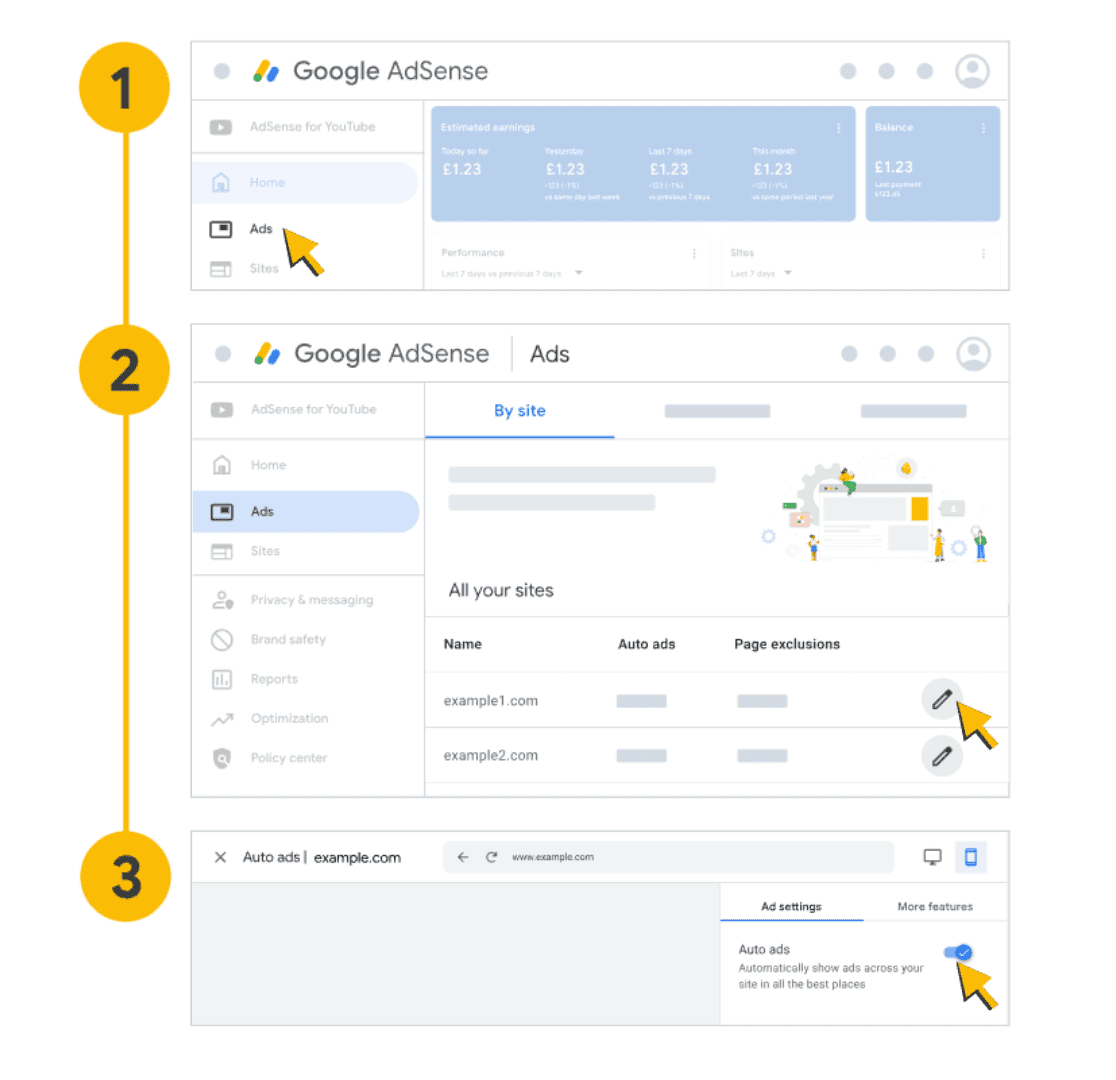
This one’s a walkthrough of turning on Auto Ads, step by step:
1 — Click “Ads” in the left sidebar
From your AdSense home screen, this is where you go to manage anything related to your actual ad units and ad settings, separate from the earnings/performance overview.
2 — Select a site under “By site,” then click the edit (pencil) icon
The Ads section lists every site connected to your AdSense account, with columns for Auto ads status and Page exclusions. Clicking the pencil icon next to a specific site (example1.com or example2.com here) opens that site’s individual ad settings.
3 — Toggle Auto Ads on
This is the actual switch. Once enabled, Google’s algorithm automatically places ads across your site “in all the best places”, meaning you don’t have to manually pick every ad unit and position yourself. It uses machine learning to test placement, format, and frequency based on your layout and content.
Quick-Start Checklist
| Task | Why It Matters |
|---|---|
| Pick a niche + specific audience | Focuses your content and attracts better-paying ads |
| Set up a self-hosted domain | Gives you full control and AdSense eligibility |
| Publish 15–25 quality blog posts | Meets 2026 approval standards |
| Add About, Contact, Privacy Policy pages | Required for approval |
| Apply for AdSense | Starts the review process |
| Add ad code once approved | Activates monetization |
| Test ad formats and placement | Improves RPM over time |
I flagged the sensitive-niche point (health, finance, legal content facing stricter 2026 review) because it’s genuinely relevant if any of your freelance-adjacent readers are in those spaces, and worth keeping if your audience skews that way.
Also, the RPM ranges in both tables are publisher-reported averages, not Google’s official numbers (Google doesn’t publish exact figures), so you may want to soften “typical RPM” to “reported RPM” if you want to stay airtight on accuracy claims.
SEO Is The Real Engine Behind AdSense Blogging
Without search traffic, AdSense usually has no serious upside. Social spikes can help, but SEO is what gives AdSense blogging compounding potential.
That means your content strategy has to be intentional. You need topics people already search for, realistic keyword targets, strong on-page structure, and enough publishing consistency to build topical depth over time. Something like RankIQ helps you find low-competition, high-traffic keywords and structure posts to rank, which is exactly the groundwork AdSense income depends on.
This is where many people get it wrong. They think AdSense is the monetization strategy, but really it is the last step. The actual strategy is content production plus search visibility plus enough pageviews to make the ad layer meaningful.
If you already understand SEO from client work, great. You have a head start. If not, treat this like a publishing business, not a quick side hustle. Because that is what it becomes.
AdSense Alternatives Worth Knowing About
AdSense is rarely the only way to monetize a blog, and it’s usually not the best way once you’ve built real traffic. As your blog grows, most content creators layer in additional income streams:
- Affiliate marketing – recommending products or tools you actually use, earning a commission on affiliate ads or affiliate links when readers buy.
- Email list monetization – building an email list from your blog traffic and promoting your own offers, online courses, or affiliate deals directly.
- Premium content or memberships – gating some of your best material behind a small subscription.
- Direct ad deals – once you have consistent traffic, some businesses will pay you directly for ad space, skipping the ad network’s cut entirely.
Most experienced bloggers don’t rely on AdSense alone forever, however – they treat it as the easiest way to get their first taste of passive income while they build toward these other, often more lucrative, revenue streams.
Adsense Blogging potential income chart – source from Medium
AdSense Policies To Know
Google runs a genuinely free program, but it comes with strict policies, and violating them (even accidentally) can get your account suspended. A few non-negotiables:
- No adult content, violence, or content promoting illegal activity.
- No encouraging visitors to click your own ads, even indirectly (“click the ads below to support us” is a bannable phrase).
- No placing ads in a way that’s designed to trick visitor clicks (fake buttons, misleading placement).
- Full compliance with Google’s program policies around traffic sources — bought or bot traffic can get you banned fast.
None of this should scare you off. The strict policies exist mostly to block spam and adult content sites that would otherwise flood the ad network with low-quality inventory. If you’re writing genuine, helpful content for a real audience, you’re already doing the only thing that actually matters here.
Things To Know Before You Begin Adsense Blogging
Some readers use ad blockers, which means a portion of your traffic will never generate ad revenue no matter how well you optimize, and that’s normal and not something you can fix. Actual earnings also vary enormously by niche, country of your readers, and content quality, so don’t benchmark yourself against someone else’s screenshot without knowing their numbers behind it.
And one mindset shift that helps more than any technical tip: AdSense rewards blogs that genuinely help people. Chase real answers to real questions your specific audience is searching for, and the traffic, and eventually the earnings, tend to follow.

Yes, if you are building a content site with serious traffic potential, you understand SEO, and your blog is not your only path to revenue. Yes, if you want to monetize informational content that sits outside your main service funnel. And yes, if you are patient enough to let traffic compound before expecting meaningful results.
Probably not, if your website exists mainly to attract premium clients, your traffic is still tiny, or your niche is too narrow to support a publishing-style model. In that case, focus on offers, authority, and conversion first. Ads can come later if the numbers justify it.
On a side note, as traffic grows, slow hosting can quietly cost you both rankings and ad revenue. Many serious bloggers move to managed hosting like BigScoots once their traffic starts to compound, so the site stays fast under load.
There is no prize for adding monetization too early. The better move is building a site that matches your income strategy. If AdSense supports that, go for it. If it gets in the way, leave it out lah. A business that converts well will always give you more room to scale than a blog chasing pennies before the traffic is there.